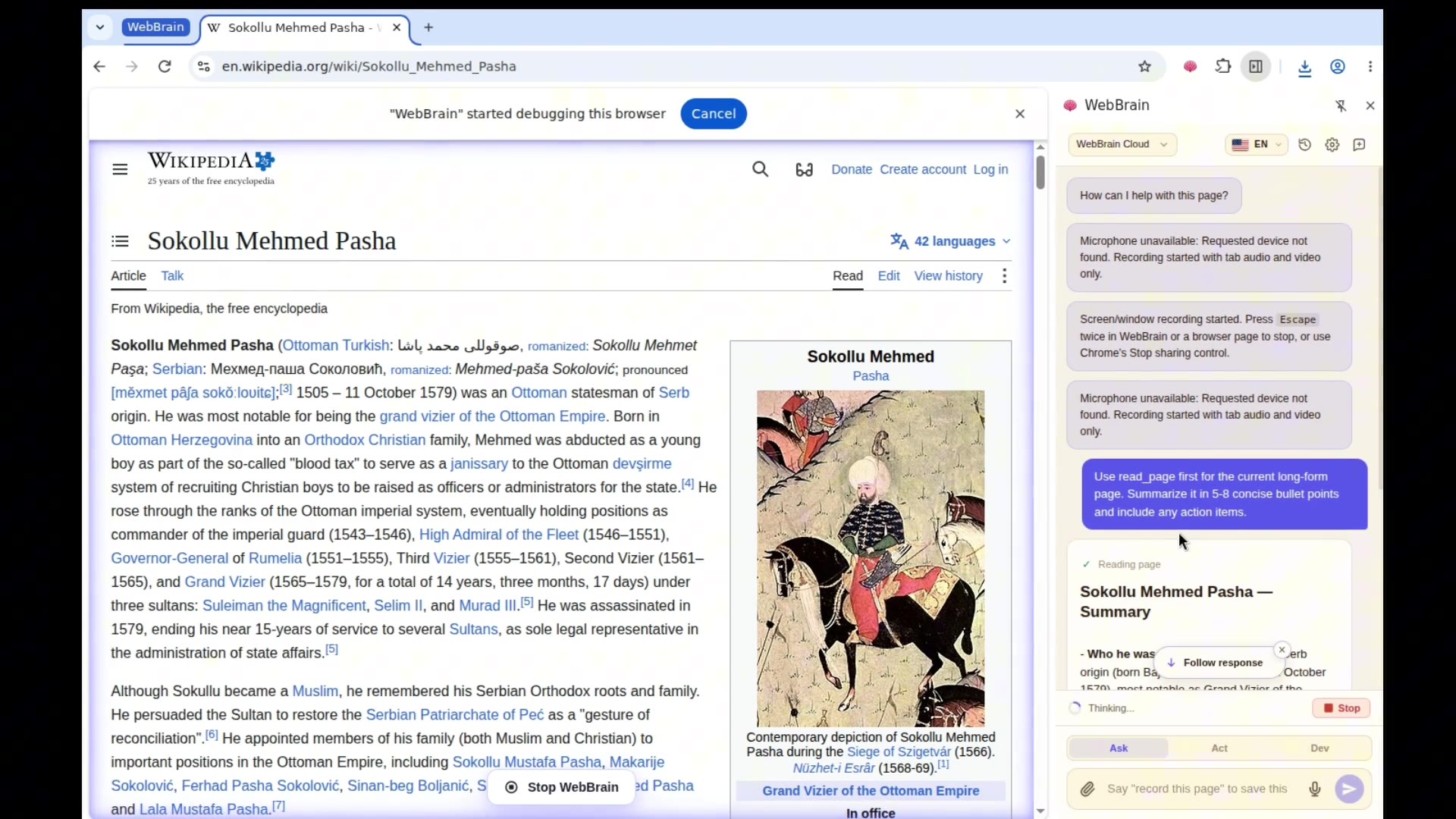
Free, open-source alternative to Claude in Chrome. Use any model, including local ones, so your pages never leave your machine.
See how WebBrain reads pages, extracts data, and automates browser tasks.
Same task, same browser. WebBrain runs Gemma 4 31B on-device and finishes first.
“The power of this approach is that the assistant has access to your sessions, cookies, and context — intact.”
“Makes Google Chrome a lot more useful.”
“Run the agent against a local model, and no page data leaves your machine.”
Connect to any OpenAI-compatible API or run local models with Ollama, LM Studio, or llama.cpp. Keep your pages, prompts, and browsing data entirely on your machine.
A full-featured AI agent that lives in your browser sidebar and understands any web page.
Reads and comprehends any web page — articles, docs, dashboards, forms. Ask questions and get instant answers from the current page content.
Click, type, scroll, navigate, and interact with pages on your behalf. Automate repetitive tasks with natural language instructions.
Asks before consequential actions; read-only Ask Mode is the default.
Extract structured data from any page — tables, lists, links, forms. Export product catalogs, search results, or any page content. Works with PDFs.
Screenshots are resized and iteratively JPEG-compressed before they leave your machine, keeping image tokens small. Smart context trimming and tool-output caps keep cloud bills predictable — no surprise spend on long sessions.
Automatic context management prevents token overflow. Intelligently trims conversation history and limits tool output for smooth, uninterrupted sessions.
Pair a fast text-only model for planning with a separate vision-capable model for reading screenshots. Cheaper and faster than using a single big multimodal model for everything.
Dismisses consent banners (OneTrust, Cookiebot, Didomi, Quantcast) before reasoning about the page. Detects paywalls and tells you honestly instead of fabricating article content or trying to bypass them.
Optional plaintext bio — name, work email, company, a throwaway password — lets the agent breeze through low-stakes signup forms without asking every time. Off by default, all stored locally.
Off by default. Stored locally in your browser, never sent to WebBrain.
Enable optional CAPTCHA providers with your own API keys and weighted fallback. hCaptcha uses NopeCHA or NoneCap; other coverage varies by provider. See provider coverage and setup.
Off by default. BYO key — no CAPTCHA service is contacted unless you enable it.
WebBrain sits at the intersection of browser-native AI plugins and full agent frameworks. Here's how it stacks up.
| Feature | WebBrain | Claude in Chrome |
|---|---|---|
| Open Source | GPL-3.0-or-later License | Proprietary |
| Price | Free forever | Requires Claude Pro ($20/mo) |
| Local LLM support | llama.cpp, Ollama | No — Claude only |
| Multi-provider | All OpenAI-compatible endpoints | Claude only |
| Side panel UI | Yes | Yes |
| Fully offline | Yes (with local LLM) | No — cloud required |
| Self-hostable | Yes | No |
WebBrain is a browser extension for end users who want an AI assistant while they browse. Agent frameworks like OpenClaw are developer tools for building automated browser pipelines. Different tools for different jobs — and you can use both.
Quick answers about setup, models, billing, safety, and how WebBrain behaves in your browser.
Cookie banners: WebBrain recognizes consent banners from common frameworks (OneTrust, Cookiebot, Didomi, Quantcast, Google Funding Choices, TrustArc) and dismisses them before reasoning about the page. Priority is "Reject all" / "Reject non-essential" / "Only necessary" when clearly visible; it falls back to "Accept all" rather than disappearing into the "Manage preferences" maze.
Paywalls: WebBrain reports the paywall honestly and tells you what it could actually see (headline, dek, first paragraphs). It does not attempt to bypass paywalls — no archive.today, 12ft.io, cookie clearing, JS disabling, or reader-mode tricks. If you want the full article, log in with a subscription or ask WebBrain to look for free coverage of the same story.
Available for Chrome, Edge, and Firefox. Free, open-source, no account required.
Manifest V3 · Chrome 116+ · Also works with Brave, Opera, Vivaldi, and other Chromium-compatible browsers.
Manifest V3 · Windows 10/11 · Requires Microsoft Edge on Windows.
Connect Claude Code, Codex, Cursor, OpenCode, or any stdio MCP client to your signed-in Chromium tabs. WebBrain keeps the task-level permission gate in the browser — and now returns structured JSON too.
No cookie export, headless login, or credential replay. The local server hands the task to WebBrain in Chrome, Edge, Brave, Opera, or Vivaldi. Firefox is not supported by the MCP bridge.
| Aspect | WebBrain | OpenClaw / Browser-Use / etc. |
|---|---|---|
| What is it? | Browser extension (end-user tool) | Agent framework / SDK (developer tool) |
| Target user | Anyone — no coding needed | Developers building automations |
| Installation | One-click browser install | Python/Docker setup required |
| UI | Built-in side panel chat | No UI — code or API only |
| Browser control | Content script (lightweight) | CDP / Playwright (full control) |
| Multi-tab workflows | Per-tab conversations | Programmable multi-tab orchestration |
| Headless mode | No — runs in your browser | Yes — headless automation |
| Extensibility | Add custom LLM providers | Full Python SDK, custom tools |
| Best for | Daily browsing AI assistant | Automated scraping / testing pipelines |