
Choose a model in Ollama. Use it inside WebBrain.
WebBrain can use Ollama’s local OpenAI-compatible endpoint today. Configure it in Settings with the official Ollama release, or try the preview launch handoff that sends the model, endpoint, and context window to WebBrain for one-click approval.
ollama launch webbrain is not part of upstream Ollama builds yet. The normal Settings path works with the official release; the one-command handoff currently requires the linked preview branch.
Use the path that matches your Ollama build
| Path | Use it when | What you do |
|---|---|---|
| Manual provider setup | You installed an official Ollama release. | Start Ollama with extension origins allowed, then enter its local endpoint and model in WebBrain Settings. |
| Launch handoff | You built the current preview branch and want the shortest setup. | Run ollama launch webbrain --model <model>, review the browser prompt, and approve the provider change. |
Configure the official Ollama release manually
- Install Ollama and pull a capable model. Choose a model that follows tool calls reliably. Agent runs work best with at least a 16k-token context window.
- Allow browser-extension origins. Quit another Ollama desktop process if it already owns port
11434, then start the server from a terminal with the origin allowlist below. - Open the WebBrain Providers page. Choose More… in the side panel’s model menu, find Ollama (Local) on the LLM tab, and open the card.
- Enter the endpoint and model. Use
http://localhost:11434/v1, then select the exact model you pulled. - Save and Test Connection. Use Load models when you want WebBrain to read the available model IDs and detect the live context window.
- Set Active. Start in the Mid prompt tier. Use Compact only when the model’s context is constrained.
ollama pull <model>
OLLAMA_ORIGINS="chrome-extension://*,moz-extension://*" ollama servecurl does not send a browser-extension origin. If Ollama works in a terminal but fails in WebBrain, restart the Ollama server with OLLAMA_ORIGINS rather than changing the provider URL.
Try the Ollama launch handoff
The preview command opens a WebBrain launch URL containing the selected model, loopback /v1 endpoint, and detected context window. The extension shows those values in a confirmation dialog before it changes anything.
git clone https://github.com/esokullu/ollama.git
cd ollama
git switch codex/ollama-webbrain-launch-handoff
cmake -S . -B build -G Ninja -DOLLAMA_MLX_BACKENDS=
cmake --build build --parallel 8

OLLAMA_ORIGINS="chrome-extension://*,moz-extension://*" ./ollama serve
Keep the server running. In another terminal, replace the example model with one available in your local Ollama installation:
./ollama launch webbrain --model qwen3.5:9b- Let the command open webbrain.one. The extension only accepts this handoff on the WebBrain Ollama launch page.
- Read the confirmation. Check the model, loopback provider URL, and context window.
- Approve the change. WebBrain updates the local Ollama provider and makes it active.
- Open the side panel. The active provider should now read Ollama (Local).
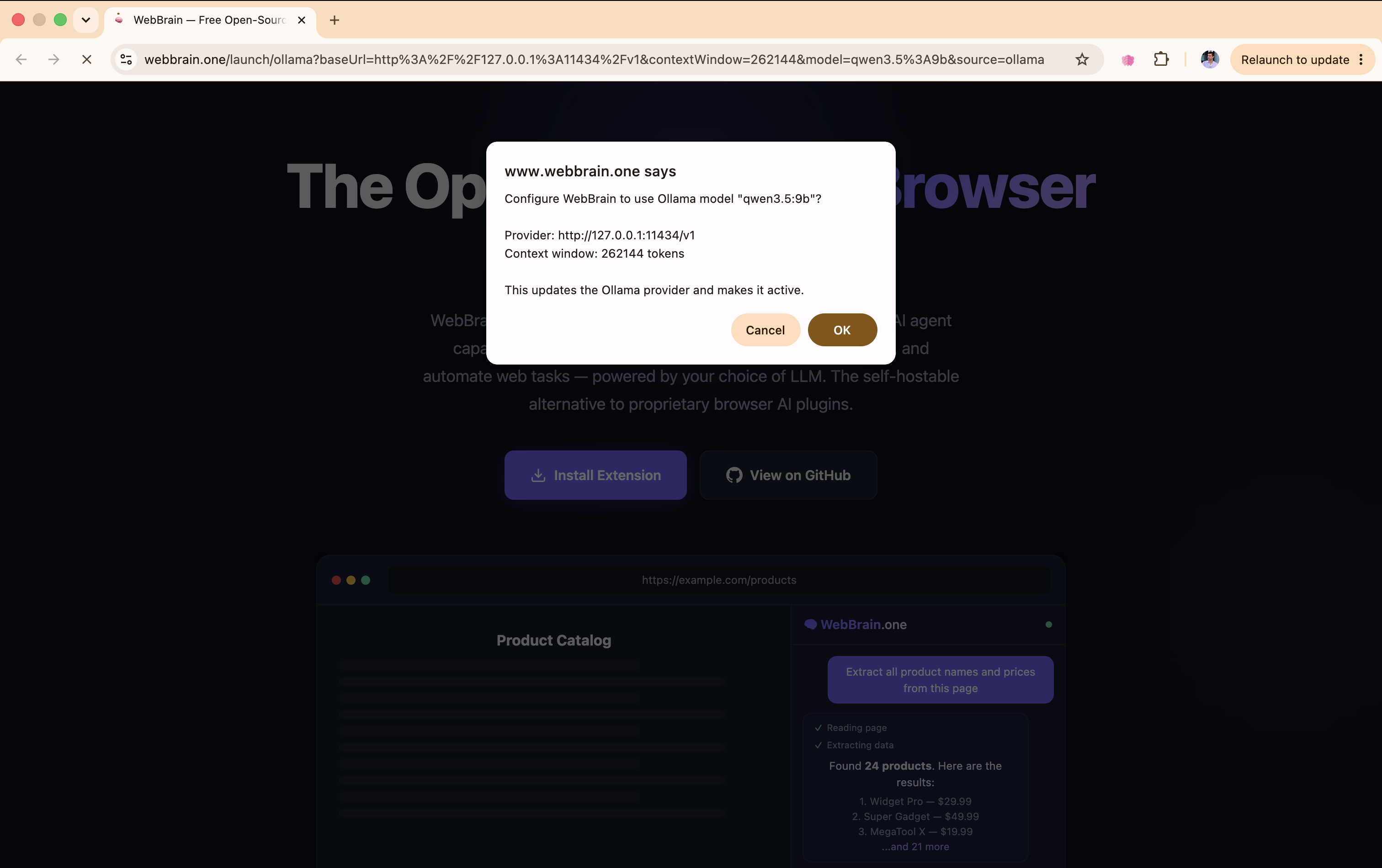
WebBrain only accepts a loopback Ollama host, an HTTP(S) URL without embedded credentials, and the OpenAI-compatible /v1 endpoint. The model name and context window are normalized before the provider is saved.
Pick a model and context that can drive an agent
- Start at 16k context or higher. That is the practical minimum for the system prompt, browser tools, page content, and a useful conversation history.
- Tool-use training matters. A model that answers normal chat well may still produce malformed or missing tool calls.
- Use Mid first. It exposes the common browser toolset without the full prompt cost. Compact can help around 8k; 4k is too small for reliable runs.
- Vision is model-specific. Only enable vision when the exact Ollama model you serve accepts images.
- Test the live model. Test Connection and Load models can read Ollama’s runtime information and refresh the detected context window.
Troubleshooting by symptom
| Symptom | Likely cause | Fix |
|---|---|---|
| WebBrain reports 403 | Ollama rejected the extension origin. | Restart the server with OLLAMA_ORIGINS="chrome-extension://*,moz-extension://*". |
| Connection refused | Ollama is stopped, or WebBrain is using the wrong port. | Run ollama serve and keep the base URL at http://localhost:11434/v1. |
| Model not found | The saved model ID does not exactly match Ollama’s catalog. | Run ollama list or use Load models, then copy the complete model name including its tag. |
| The model talks instead of using browser tools | The model is weak at tool use, or the context/prompt tier is too constrained. | Try a tool-trained model, increase context, or move from Compact to Mid. |
ollama launch is unknown | You are running an upstream Ollama build. | Use manual provider setup, or build the linked preview branch. |
| The launch page opens but nothing prompts | The WebBrain extension is missing, disabled, or outdated. | Enable the current extension on webbrain.one, reload the launch page, and run the command again. |
For the announcement, screenshots, and current preview rationale, read WebBrain now has an Ollama launch handoff.