
Read, review, and work faster across Google Docs, Sheets, Slides, Forms, and Drive.
Google Docs, Sheets, and Slides render their main editing surfaces on <canvas>, which hides document text and spreadsheet cells from ordinary DOM and accessibility-tree reads. WebBrain pairs surface-aware suggested actions with direct same-origin endpoints and canvas snapshot extraction so Ask and Act runs work reliably out of the box.
What WebBrain adds in Google Workspace
Open any supported Google Workspace tab and start a fresh conversation in the WebBrain side panel. Under Suggested actions, WebBrain detects the exact product, document ID, active sheet tab (gid), Form view (editor vs. responder), and whether the file is still untitled.
| Surface | URL scope | Suggested actions & modes | Primary read path |
|---|---|---|---|
| Google Docs | docs.google.com/document/d/<id> |
Draft an outline or document (Act on untitled), Summarize & find action items (Ask), Suggest edits & improvements (Ask), Export to Markdown (Ask) |
fetch_url on /mobilebasic (fallback: read_page via DOCS_modelChunk or research_url) |
| Google Sheets | docs.google.com/spreadsheets/d/<id> |
Build a table or tracker (Act on untitled), Analyze sheet & key metrics (Ask), Generate a Sheets formula (Ask), Audit & clean sheet data (Ask) |
fetch_url on /gviz/tq?tqx=out:csv (with &gid=), fallback /htmlview |
| Google Slides | docs.google.com/presentation/d/<id> |
Draft presentation outline (Act on untitled), Summarize slides & key takeaways (Ask), Generate speaker notes (Ask), Improve slide copy & flow (Ask) |
fetch_url on /htmlpresent (fallback: read_page via DOCS_modelChunk or research_url) |
| Google Forms | docs.google.com/forms/d/... |
Editor (/edit): Suggest form questions, Review form clarity & flow (Ask)Responder ( /viewform, /d/e/...): Summarize form questions (Ask) |
read_page + get_accessibility_tree (filter: "visible") |
| Google Drive | drive.google.com/drive/... |
Summarize visible Drive files (Ask, with automatic get_accessibility_tree preflight) |
get_accessibility_tree (filter: "visible", maxDepth: 10) |
When a Doc, Sheet, or Slides title matches an untitled placeholder (across English and localized Google titles such as Untitled document, Adsız doküman, Unbenanntes Dokument, Document sans titre, 無題のドキュメント, or 未命名文档), WebBrain surfaces an Act-mode drafting action first so you can plan an outline or table before typing.
Summarize, review, and export to Markdown
On a populated Google Doc, the side panel offers three one-click actions above the composer. Read-only actions stay strictly in Ask mode and never edit your document unless you switch to an editing request.
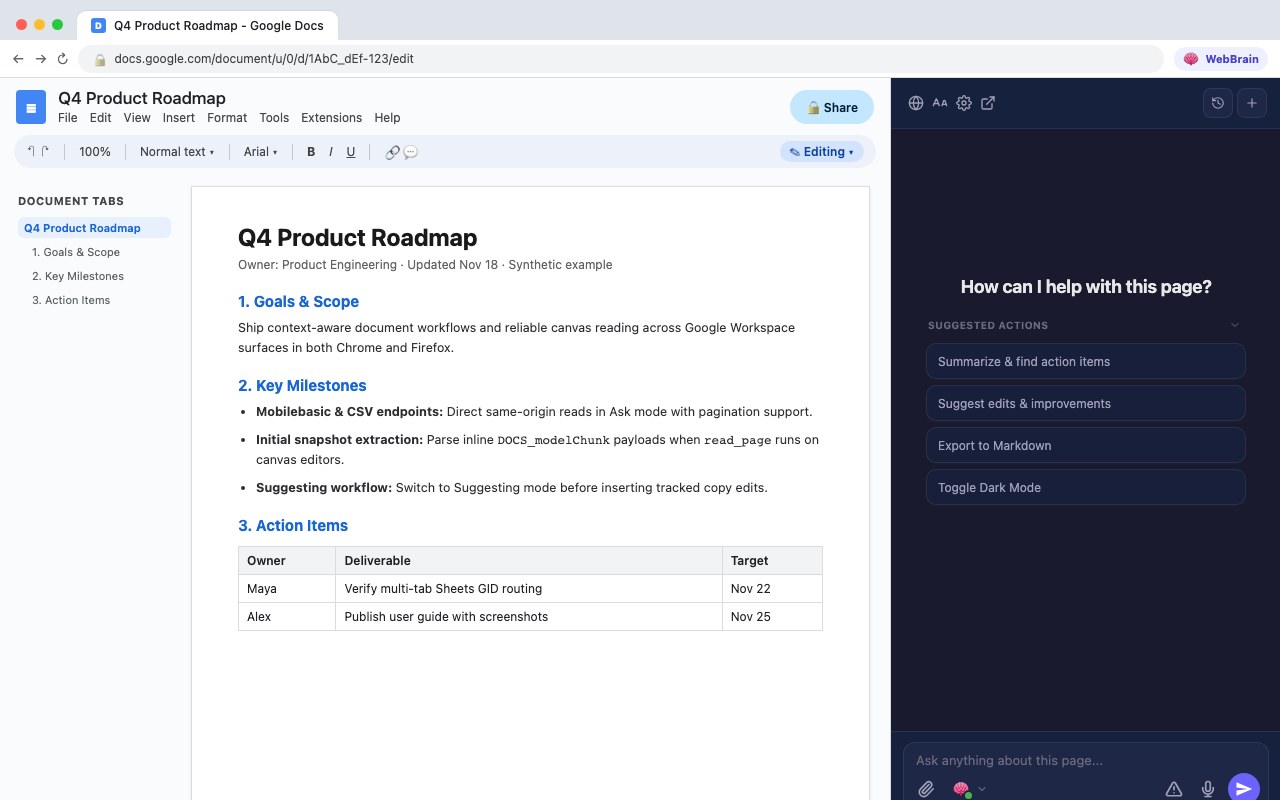
| Action | Mode | What it does |
|---|---|---|
| Draft an outline or document | Act |
Shown first on untitled docs. Asks for your topic, target audience, desired sections, and tone before typing into the document. |
| Summarize & find action items | Ask |
Reads the full document via /mobilebasic (paginating with offset/nextOffset while hasMore is true) and returns an executive summary, key decisions, and an action-item checklist with owners and deadlines. |
| Suggest edits & improvements | Ask |
Reviews clarity, structure, tone, and grammar, returning prioritized “Before → After” suggestions by section without altering the file. |
| Export to Markdown | Ask |
Converts headings, bulleted and numbered lists, links, emphasis, and tables into a copy-ready Markdown code block. |
Editing and Suggesting mode
When you ask WebBrain in Act mode to make changes directly in a Google Doc, the updated google-docs site adapter guides the agent around canvas editor quirks:
- Tracked changes: When you ask for tracked suggestions without overwriting existing text, WebBrain switches the toolbar mode dropdown from Editing to Suggesting before typing—or presents “Before → After” edits in chat.
- Typing into the canvas: Direct DOM writes on the canvas fail, so Act mode clicks into the document to focus the floating editor textbox or uses keyboard shortcuts.
- Collaborative cursors: Real-time collaborators can shift text and cursor positions while reading or typing, so the adapter tells the agent to re-read after a brief pause if a write appears lost.
Analyze data, write formulas, and audit messy columns
Google Sheets renders its cell grid on canvas, so the accessibility tree only sees menus, the toolbar, and the formula bar for the currently selected cell. WebBrain reads the actual spreadsheet rows in bulk using direct same-origin endpoints and preserves the active tab’s gid.
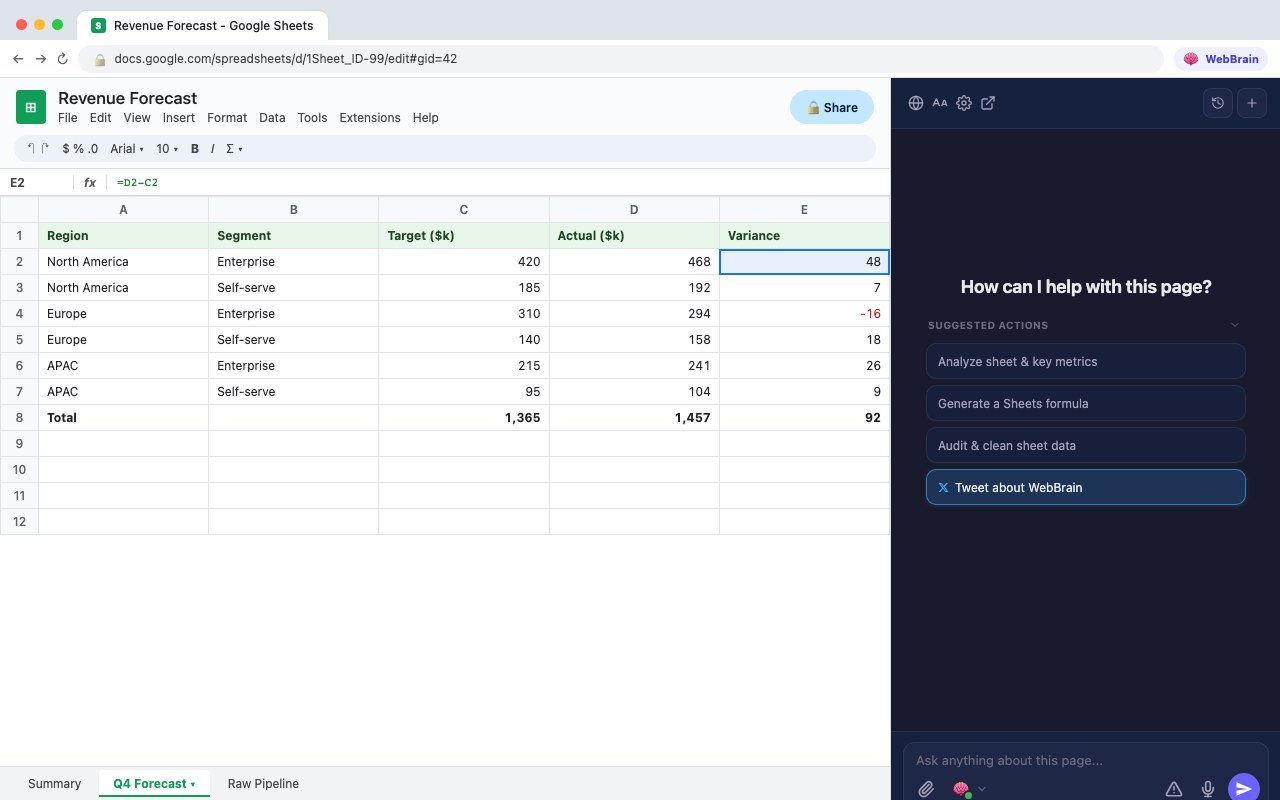
#gid= or ?gid= from the active tab URL when fetching CSV data from /gviz/tq?tqx=out:csv.| Action | Mode | What it does |
|---|---|---|
| Build a table or tracker | Act |
Shown first on untitled spreadsheets. Asks for your use case, columns, and sample rows or formulas before writing to the sheet. |
| Analyze sheet & key metrics | Ask |
Reads the active tab via /gviz/tq?tqx=out:csv (or /htmlview for all tabs) and summarizes columns, row count, key metrics, trends, outliers, and pivot-style breakdowns. |
| Generate a Sheets formula | Ask |
Inspects exact column headers and data layout first, then writes ready-to-paste formulas (QUERY, XLOOKUP, ARRAYFORMULA, SUMIFS) tailored to your actual column letters. |
| Audit & clean sheet data | Ask |
Flags duplicates, missing values, inconsistent date/number/text formatting, and formula errors, and provides cleanup formulas or an optional Apps Script snippet. |
For single-cell checks or edits, WebBrain clicks a cell (or jumps via the Name Box) and reads or types through the formula bar, using Enter and Tab to commit. For bulk writes across dozens or hundreds of cells, the Sheets adapter instructs the agent to be honest about canvas-UI speed limits and generate a copy-ready formula or CSV for you to paste.
Slide-by-slide summaries, speaker notes, and copy edits
On docs.google.com/presentation/d/<id>, WebBrain reads slide text cleanly via /htmlpresent (or falls back to read_page’s DOCS_modelChunk snapshot and research_url).
| Action | Mode | Output |
|---|---|---|
| Draft presentation outline | Act |
Shown first on untitled decks. Collects topic, audience, goal, and slide count before editing. |
| Summarize slides & key takeaways | Ask |
Core narrative, slide-by-slide summary, and top takeaways or action items without modifying the deck. |
| Generate speaker notes | Ask |
Concise talking points matched to each slide’s headings and bullets, plus transition cues between slides. |
| Improve slide copy & flow | Ask |
Reviews narrative flow, clarity, and visual density with slide-by-slide “Before → After” rewrites. |
Form builders, responder views, and visible Drive listings
Google Forms and Google Drive use standard HTML and accessible DOM structures, so WebBrain adapts its suggested actions to whether you are editing a form, filling one out, or browsing Drive folders.
/edit)
Suggest & review questions
Suggest form questions proposes additional questions, answer choices, and validation rules. Review form clarity & flow audits existing items for ambiguity, leading phrasing, missing options, and completion friction using read_page and visible accessibility-tree inspection.
/viewform)
Summarize before you fill
Summarize form questions reads all sections in Ask mode and lists required vs. optional fields plus what information you should gather before submitting.
Summarize visible Drive files
Active on My Drive, Shared with me, Recent, Starred, Priority, folder views, and Drive search. Automatically preflights get_accessibility_tree (filter: "visible", maxDepth: 10) to group visible items by type or topic and suggest cleanup ideas without moving, renaming, or deleting anything.
How canvas reading and Ask-mode safety work
Read-only Ask mode has no click or navigation tools, and read_page only inspects the currently open tab. To keep Ask mode fast, complete, and safe across Google Office surfaces, WebBrain combines three mechanisms:
1. Direct same-origin endpoints for full reads
Rather than clicking Export menus or scrolling through virtualized canvases, Ask-mode actions instruct fetch_url to request Google’s lightweight, non-redirecting same-origin views using your browser’s signed-in session—paginating automatically with offset/nextOffset whenever hasMore is true:
| Surface | Primary endpoint | Fallback path |
|---|---|---|
| Google Docs | https://docs.google.com/document/d/<DOC_ID>/mobilebasic |
read_page (DOCS_modelChunk) or research_url on /mobilebasic |
| Google Sheets | https://docs.google.com/spreadsheets/d/<SHEET_ID>/gviz/tq?tqx=out:csv[&gid=<GID>] |
fetch_url or research_url on /htmlview (all tabs) |
| Google Slides | https://docs.google.com/presentation/d/<ID>/htmlpresent |
read_page (DOCS_modelChunk) or research_url on /htmlpresent |
2. DOCS_modelChunk snapshot extraction in read_page
When you ask an ad-hoc question in chat and the agent calls read_page directly on a Google Docs or Slides tab (with includeChrome: false, the default), WebBrain’s Chrome content script, Firefox content script, and CDP reader extract embedded text chunks from inline DOCS_modelChunk script blocks instead of returning only toolbar menu labels.
- Labeled as an initial snapshot: The extracted text sets
textSourcetogoogle-docs-model (initial snapshot)and prepends a clear notice explaining that edits typed after page load may not appear there—pointing the model tofetch_urlon/mobilebasicor/htmlpresentfor the current saved document. - Honors
includeChrome: true: When a caller explicitly requests page chrome (menus, toolbar, raw DOM), WebBrain skipsDOCS_modelChunkextraction and returns the regular DOM text.
3. Strict URL validation & tool discipline
- Exact host matching: Suggested actions only activate on exact
docs.google.comanddrive.google.comhosts, rejecting lookalike domains. - Reserved route filtering: Path segments such as
edit,view,copy,preview,export,mobilebasic,htmlview,htmlpresent,viewform,create, andneware never mistaken for document IDs. - Read-only Ask enforcement: Every Ask-mode Workspace action constrains its instructions to read-only tools (
fetch_url,read_page,research_url,get_accessibility_tree) and forbids clicking, navigating, or editing.
Troubleshooting & common questions
| Question | Answer |
|---|---|
Why didn’t my latest edit show up in an ad-hoc read_page call? |
DOCS_modelChunk captures the document state from initial page load. Reload the tab, or ask WebBrain to read the saved document via /mobilebasic (Docs) or /htmlpresent (Slides)—all built-in suggested actions already do this first. |
| How does Sheets know which tab I want to analyze? | WebBrain reads gid from either ?gid= or #gid= in your current URL and appends &gid=<GID> to the CSV query. If CSV export fails or you want every tab in the workbook, it falls back to /htmlview. |
| Where did the Suggested Actions row go? | Suggested actions appear on empty conversations and collapse cleanly via the chevron above the chips. If you collapsed them earlier, click the chevron to expand them again, or start a new chat with + New chat. |